NSX Bytes: No NSX Managers Listed in Web Client After vCenter Certificate Upgrade
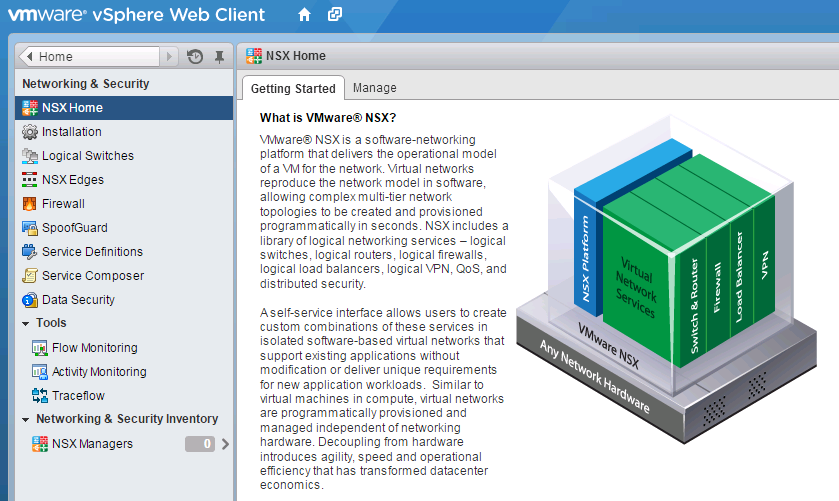
Certificates and VMware don’t have a great history and there are a (https://www.google.com.au/?gfe_rd=cr&ei=z5tWVteQDa3R8Ae44624CA&gws_rd=ssl#q=vmware+ssl+certificate) centered around people’s struggles with vCenter, Lookup Service or Web Client Certificate management. I’ve recently had a little fun with a revoked vCenter certificate ((https://twitter.com/anthonyspiteri/status/661799716422746112)) that required replacement. Without going into the details of the pain I went through to successfully get the certificate updated and working with vCenter and the Web Client, when I did eventually get things in working order with the new publicly signed certificate I logged back into the Web Client and saw that I had no NSX Managers listed in the Web Client.
I’ve (http://anthonyspiteri.net/nsx-bytes-networking-security-inventory-reports-0-nsx-managers/) as it relates to user permissions, but as nothing had changed from a permissions point of view this was surly due to the certificate changes on the vCenter. Logging into the NSX Manager and going to the Manage Tab and NSM Management Service the vCenter Server Status was listed as Disconnected.
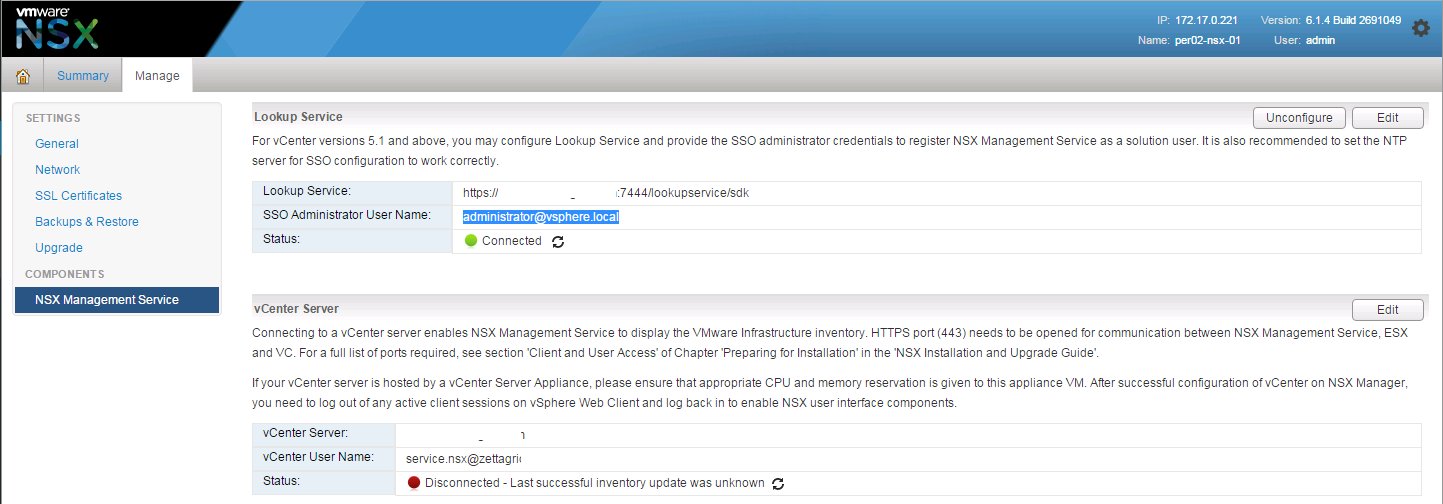 I also found corresponding errors in the Manager Logs as shown below.
2015-11-25 11:38:21.447 GMT INFO ViInventoryConnKeepAliveThread ViInventory$ViInventoryConnKeepAliveThread:6571 - Connection Handler is either null or not connected
2015-11-25 11:38:22.439 GMT INFO systemEventsPool-1 DefaultVcConnection:276 - Disconnect default vc connection
2015-11-25 11:38:22.439 GMT INFO systemEventsPool-1 VSMAgentStateUpdater$VcConnectionLifecycleListener:231 - Detected VC disconnect
2015-11-25 11:38:22.919 GMT INFO ViInventoryThread ViInventory:548 - Inventory cannot connect to VC because:null
2015-11-25 11:38:24.367 GMT ERROR DefaultVcConnectionKeepaliveThread SoapBindingImpl:134 - SOAP fault
javax.xml.ws.soap.SOAPFaultException: Invalid credentials
at com.sun.xml.internal.ws.fault.SOAP11Fault.getProtocolException(Unknown Source)
at com.sun.xml.internal.ws.fault.SOAPFaultBuilder.createException(Unknown Source)
at com.sun.xml.internal.ws.client.dispatch.DispatchImpl.doInvoke(Unknown Source)
at com.sun.xml.internal.ws.client.dispatch.DispatchImpl.invoke(Unknown Source)
at com.vmware.vim.sso.client.impl.SoapBindingImpl.sendMessage(SoapBindingImpl.java:131)
at com.vmware.vim.sso.client.impl.SoapBindingImpl.sendMessage(SoapBindingImpl.java:82)
at com.vmware.vim.sso.client.impl.SecurityTokenServiceImpl$RequestResponseProcessor.sendRequest(SecurityTokenServiceImpl.java:677)
at com.vmware.vim.sso.client.impl.SecurityTokenServiceImpl$RequestResponseProcessor.executeRoundtrip(SecurityTokenServiceImpl.java:611)
at com.vmware.vim.sso.client.impl.SecurityTokenServiceImpl.acquireToken(SecurityTokenServiceImpl.java:120)
at com.vmware.vshield.vsm.vcserver.VcConnection.getSamlToken(VcConnection.java:389)
at com.vmware.vshield.vsm.vcserver.VcConnection.defaultLogin(VcConnection.java:201)
at com.vmware.vshield.vsm.vcserver.VcConnection.login(VcConnection.java:186)
at com.vmware.vshield.vsm.vcserver.VcConnection.login(VcConnection.java:174)
at com.vmware.vshield.vsm.vcserver.DefaultVcConnection.checkConnect(DefaultVcConnection.java:228)
at com.vmware.vshield.vsm.vcserver.DefaultVcConnection.getVcConnection(DefaultVcConnection.java:187)
at com.vmware.vshield.vsm.vcserver.DefaultVcConnectionKeepaliveThread.getVcConnection(DefaultVcConnectionKeepaliveThread.java:121)
at com.vmware.vshield.vsm.vcserver.DefaultVcConnectionKeepaliveThread.run(DefaultVcConnectionKeepaliveThread.java:73)
2015-11-25 11:38:24.368 GMT INFO DefaultVcConnectionKeepaliveThread SecurityTokenServiceImpl$RequestResponseProcessor:742 - Provided credentials are not valid.
2015-11-25 11:38:26.181 GMT ERROR NVPStatusCheck ControllerServiceImpl:1658 - vsm UUID not match for controller 172.17.0.202: 421E9E74-5C5F-27C0-1E93-3394D3AC56A0
2015-11-25 11:38:26.181 GMT ERROR NVPStatusCheck ControllerServiceImpl:1658 - vsm UUID not match for controller 172.17.0.201: 421E9E74-5C5F-27C0-1E93-3394D3AC56A0
2015-11-25 11:38:26.181 GMT ERROR NVPStatusCheck ControllerServiceImpl:1658 - vsm UUID not match for controller 172.17.0.200: 421E9E74-5C5F-27C0-1E93-3394D3AC56A0
2015-11-25 11:38:27.478 GMT INFO DefaultVcConnectionKeepaliveThread DefaultVcConnection:276 - Disconnect default vc connection
2015-11-25 11:38:27.479 GMT INFO DefaultVcConnectionKeepaliveThread VSMAgentStateUpdater$VcConnectionLifecycleListener:231 - Detected VC disconnect
2015-11-25 11:38:27.479 GMT INFO DefaultVcConnectionKeepaliveThread DefaultVcConnectionKeepaliveThread:124 - Could not get VC Connection:com.vmware.vshield.vsm.vcserver.VcConnectionNotAvailableException:
core-services:500:vCenter Connection is not available.:com.vmware.vim.binding.vim.fault.InvalidLogin:
The reason for this happening is the NSX Manager trusted the previous certificate and needs to be reconnected so that the new certificate can be trusted and accepted.
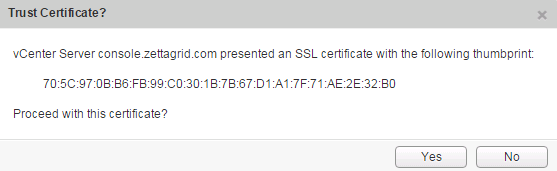 Once that’s been done you should have a green light and the NSX Manager will resync up with the vCenter Inventory and all operations will be back to normal…an easy fix to a logical issue!