Quick Fix: Python Error When Removing PernixData FVP Host Extensions
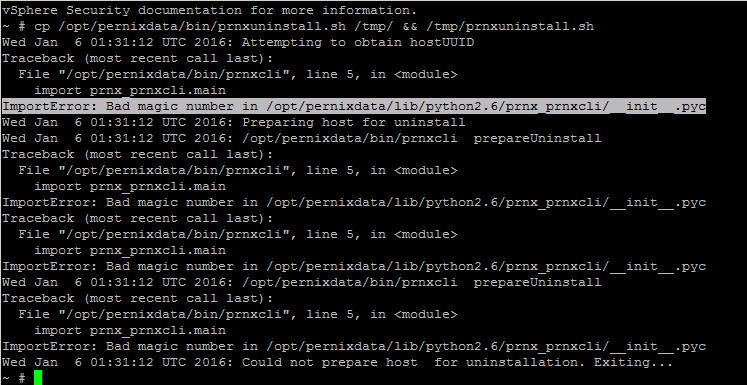
Came across an issue this morning trying to remove old 2.0 PernixData FVP Host Extensions from an ESXi 5.5 Update 3a Host. When running the uninstall script I was getting the error shown below.
There is an old known issue with the version of Python that gets installed with the latest updates of ESXi 5.x and older versions of the FVP Host extensions.
FVP compatibility with ESXi 5.5, 5.1, and 5.0, and Python 2.7 Date announced: March 31, 2015 Upgrade issues exist with various ESXi 5.5, 5.1, and 5.0 releases that upgrade to Python 2.7, which is not compatible with FVP 2.5.0.1 or lower. Upgrading to any ESXi 5.5, 5.1, or 5.0 patch that upgrades the Python version to 2.7 (or later) requires an FVP upgrade to 2.5.0.2 or later. For additional information, please reference KB 1230.
That internal PernixData KB isn’t working at the moment, but I worked out a series of steps to get to a point where the FVP Extensions can be removed. If you have FVP installed with these versions:
- FVP 1.5
- FVP 2.0.0.0-3
- FVP 2.0.1.0-5
- FVP 2.5.0.0-1
You can apply the same steps to resolve the issue.
- Check the Status of the FVP Service
- Install over the top of the currently installed version at least 2.5.0.4-37360
- Reboot the Host
- Run the Uninstall Script
The Shell Dump is below of the steps above.
The ESXi Shell can be disabled by an administrative user. See the
vSphere Security documentation for more information.
~ # cp /opt/pernixdata/bin/prnxuninstall.sh /tmp/ && /tmp/prnxuninstall.sh
Wed Jan 6 01:31:12 UTC 2016: Attempting to obtain hostUUID
Traceback (most recent call last):
File "/opt/pernixdata/bin/prnxcli", line 5, in <module>
import prnx_prnxcli.main
ImportError: Bad magic number in /opt/pernixdata/lib/python2.6/prnx_prnxcli/__init__.pyc
Wed Jan 6 01:31:12 UTC 2016: Preparing host for uninstall
Wed Jan 6 01:31:12 UTC 2016: /opt/pernixdata/bin/prnxcli prepareUninstall
Traceback (most recent call last):
File "/opt/pernixdata/bin/prnxcli", line 5, in <module>
import prnx_prnxcli.main
ImportError: Bad magic number in /opt/pernixdata/lib/python2.6/prnx_prnxcli/__init__.pyc
Traceback (most recent call last):
File "/opt/pernixdata/bin/prnxcli", line 5, in <module>
import prnx_prnxcli.main
ImportError: Bad magic number in /opt/pernixdata/lib/python2.6/prnx_prnxcli/__init__.pyc
Wed Jan 6 01:31:12 UTC 2016: /opt/pernixdata/bin/prnxcli prepareUninstall
Traceback (most recent call last):
File "/opt/pernixdata/bin/prnxcli", line 5, in <module>
import prnx_prnxcli.main
ImportError: Bad magic number in /opt/pernixdata/lib/python2.6/prnx_prnxcli/__init__.pyc
Wed Jan 6 01:31:12 UTC 2016: Could not prepare host for uninstallation. Exiting...
~ # /etc/init.d/prnxd status
/opt/pernixdata/bin/prnxd: error while loading shared libraries: libpython2.6.so.1.0: cannot open shared object file: No such file or directory
~ # python -V
Python 2.7.8

/vmfs/volumes/8ac52f9a-1de48bf0 # esxcli software vib install -d '/vmfs/volumes/SYD02-STRG01-TEMPLATES/ISO/PernixData-host-extension-vSphere5.5.0_2.5.0.4-37360.zip'
Installation Result
Message: Operation finished successfully.
Reboot Required: false
VIBs Installed: PernixData_bootbank_pernixcore-vSphere5.5.0_2.5.0.4-37360
VIBs Removed: PernixData_bootbank_pernixcore-vSphere5.5.0_2.0.0.2-32837
VIBs Skipped:
/vmfs/volumes/8ac52f9a-1de48bf0 # /etc/init.d/prnxd status
prnxd not running
/vmfs/volumes/8ac52f9a-1de48bf0 # cp /opt/pernixdata/bin/prnxuninstall.sh /tmp/ && /tmp/prnxuninstall.sh
Wed Jan 6 02:27:37 UTC 2016: Attempting to obtain hostUUID
Wed Jan 6 02:27:37 UTC 2016: Preparing host for uninstall
Wed Jan 6 02:27:37 UTC 2016: /opt/pernixdata/bin/prnxcli prepareUninstall
Error: Could not connect to PernixData host Extension server on host localhost:751
Wed Jan 6 02:27:38 UTC 2016: /opt/pernixdata/bin/prnxcli prepareUninstall
Error: Could not connect to PernixData host Extension server on host localhost:751
Wed Jan 6 02:27:38 UTC 2016: Could not prepare host for uninstallation. Exiting...
/vmfs/volumes/8ac52f9a-1de48bf0 #
/vmfs/volumes/8ac52f9a-1de48bf0 # /etc/init.d/prnxd start
Traceback (most recent call last):
File "<string>", line 2, in <module>
File "/jenkins_data/workspace/Core_Builds/core.builder/build/release/common/python2.7/pyprnx_prnxd/bdist.linux-x86_64/egg/prnx_prnxd/util/kernel.py", line 147, in PushVMKSymbols
RuntimeError: (19, 'ioctl failure: No such device')
/vmfs/volumes/8ac52f9a-1de48bf0 # reboot
login as: root
Using keyboard-interactive authentication.
Password:
The time and date of this login have been sent to the system logs.

VMware offers supported, powerful system administration tools. Please
see www.vmware.com/go/sysadmintools for details.

The ESXi Shell can be disabled by an administrative user. See the
vSphere Security documentation for more information.
~ # /etc/init.d/prnxd status
prnxd pid=34805
~ # cp /opt/pernixdata/bin/prnxuninstall.sh /tmp/ && /tmp/prnxuninstall.sh
Wed Jan 6 02:44:44 UTC 2016: Attempting to obtain hostUUID
Wed Jan 6 02:44:45 UTC 2016: Preparing host for uninstall
Wed Jan 6 02:44:45 UTC 2016: /opt/pernixdata/bin/prnxcli 4c4c4544-0036-3010-8046-c8c04f573232 prepareUninstall
Wed Jan 6 02:45:17 UTC 2016: Prepared host 4c4c4544-0036-3010-8046-c8c04f573232 for uninstall successfully
Wed Jan 6 02:45:17 UTC 2016: Stopping PernixData mgmt daemon
Wed Jan 6 02:45:17 UTC 2016: /etc/init.d/prnxd stop
quiescing data to backing storage ... Disabling writeback on the host object
watchdog-PRNXD: Terminating watchdog process with PID 34780
done
Wed Jan 6 02:45:29 UTC 2016: Attempting to unload pernixgateway2 module
Wed Jan 6 02:45:29 UTC 2016: /sbin/vmkload_mod -u pernixgateway2
Module pernixgateway2 successfully unloaded
Wed Jan 6 02:45:34 UTC 2016: Attempting to unload pernixcore module
Wed Jan 6 02:45:34 UTC 2016: /sbin/vmkload_mod -u pernixcore
Module pernixcore successfully unloaded
Wed Jan 6 02:45:39 UTC 2016: Attempting to unload pernixgateway module
Wed Jan 6 02:45:39 UTC 2016: /sbin/vmkload_mod -u pernixgateway
Module pernixgateway successfully unloaded
Wed Jan 6 02:45:39 UTC 2016: Attempting to unload pernixcommon module
Wed Jan 6 02:45:39 UTC 2016: /sbin/vmkload_mod -u pernixcommon
Module pernixcommon successfully unloaded
Wed Jan 6 02:45:40 UTC 2016: Attempting to uninstall the PernixData VIB bundle
Wed Jan 6 02:45:40 UTC 2016: esxcli software vib remove --force -n pernixcore-vSphere5.5.0
Removal Result
Message: Operation finished successfully.
Reboot Required: false
VIBs Installed:
VIBs Removed: PernixData_bootbank_pernixcore-vSphere5.5.0_2.5.0.4-37360
VIBs Skipped:
Wed Jan 6 02:49:44 UTC 2016: PernixData VIB bundle has been successfully uninstalled